Dear moderation,
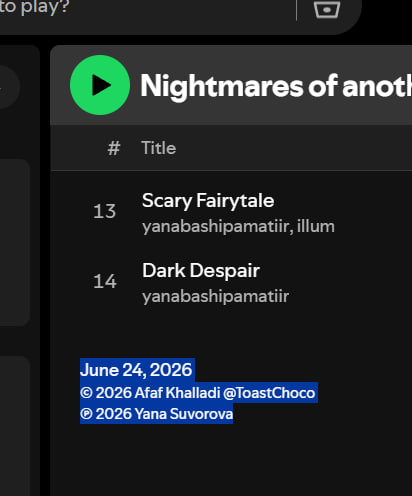
We’re having trouble with incorrect copyright identification for our album. This is specific to Spotify, but everything seems to be working correctly on other platforms. The cover artist(the artist who created the painting) is listed as the album’s creator(If I understand correctly, the artist who directly created the music should be the copyright holder of the album).
Could you please tell me if this can be corrected?
Artist (correct owner of the album rights) - yanabashipamatiir (Yana Suvorova)
The artist who created the painting commissioned for our album - Afaf Khalladi @ToastChoco
Sincerely, Yana Suvorova

Hello! Thank you very much for your reply.
I am referring to the Spotify platform. I am attaching a screenshot.
Hi @YanaSuvorova,
The ℗ symbol refers to the sound recording copyright. The © symbol refers to the copyright notice for works other than sound recordings. In this case, I’m not sure whether it refers only to the album cover art or also to the underlying musical composition and lyrics. I’m curious about this as well.
The explanation by Spotify is not very clear, so it would be great if @Carlos could explain it in more detail.
1 Like
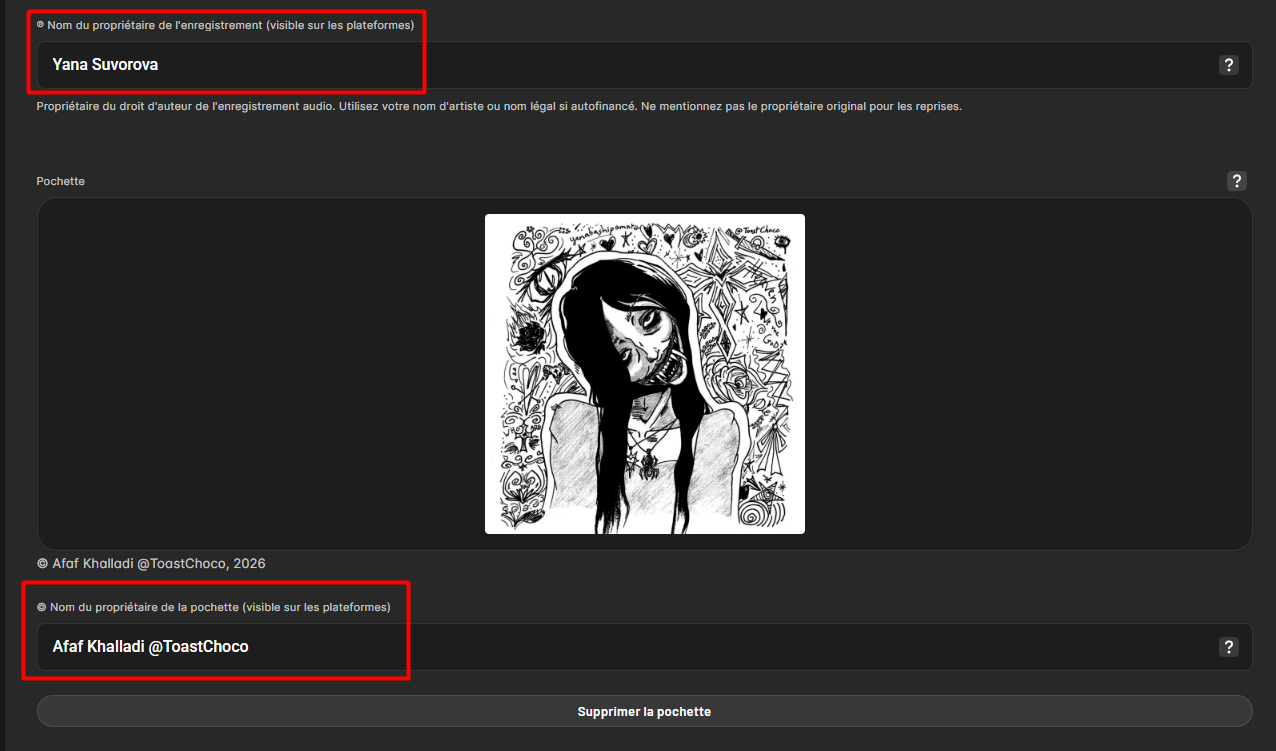
As specified on the iMusician dashboard (you can see it on the screenshot I shared):
- © shows the name of the copyright owner for the artwork
- ℗ shows the name of the copyright owner for the audio recording
1 Like
Thank you very much for the information! Sorry to bother you.
Hi @Carlos,
I’ve contacted Spotify regarding their copyright policy. According to their support team:
"on Spotify - the C Line displays the copyright information for musical composition and lyrics and the P Line protecting the specific sound recording. In this case, I suggest you to please contact your distributor for more information as they only have access to all these"
Given this explanation, wouldn’t it make more sense for the artist name — in this case, Yana Suvorova — to be listed as the © copyright owner?
Thank you.
The names that appear in these fields is up to your preference 
Hi @Carlos,
Great! Could you help me set that up on iMusician? From my understanding, the default setup is to attribute the C Line to the artwork copyright owner, but I’d like to attribute it to the copyright owner of the musical composition and lyrics instead. There is a field to enter the artwork copyright owner, but I couldn’t find one for the copyright owner of the musical composition and lyrics. Thanks!
If you want to enter the composer’s name instead of the artwork’s owner in the © field, you can simply request a modification to your release: Can I make modifications to my release? | iMusician
Hi @Carlos,
Isn’t there a way to do that as part of submitting the release for delivery, so it doesn’t require a request modification? I’m asking because modifying a release has an associated cost for customers who don’t have an active subscription or are on the AMPLIFY tier. Thank you.
Yes of course, you can specify that at no additional costs when you’re still creating your order.
However, after the order was paid and submitted for review, then the modification fees will apply depending on your subscription plan if you want to change the information you initially provided.
Hi @Carlos,
Could you help me with this?
When submitting the music and creating the order, I can only find fields to add the copyright owner of the recording and the copyright owner of the release artwork. I can’t find a field to add the copyright owner of the musical composition and lyrics. Am I overlooking something? Thank you.
There isn’t one. Just add the name of this person in the © field directly instead of the name of the artwork owner.
1 Like
This topic was automatically closed 30 days after the last reply. New replies are no longer allowed.