Release stuck

Hello,

My album release MIDNIGHT for the band Toward The Throne, scheduled for February 26th, 2026, has been in review status since mid-December 2025.

The issue is that I need to release a single from this release in one week.

Is there any way to speed up the review process? Or to get in touch with someone at iMusician who could help me?

Thanks in advance for your help!

Fab’.

1 Like

hi @Fab_TTT , what is the status of your single release? if you didn’t start it I guess thet one week is to tight but I’m asking @Carlos from the Team for advice. For what regards the album release I don’t see any problems for now as the date is still far enough. :v:

Hello Andi,

Thank you for your quick feedback!

I didn’t start the single release, i was thinking that the full album release needed to be “verified” before i can release one track of this album.

Did i unsterdood this wrong?

1 Like

it’s 2 different releases we are talking about as far as I can see…
As far as I know you don’t need to wait for the album approval before starting the single release. You can create and submit a single release separately, even if the album is already in process. Just make sure all metadata and audio files are correct for each release to avoid delays. :v:

Hey @Fab_TTT,

I can confirm these two statements. Unfortunately, it’s not possible at this stage to release your single under such short notice :confused:

1 Like

Hello guys,

Thanks for your feedback, and my apologies for the late reply.

Regarding what was discussed above, it seems that we misunderstood what is and isn’t possible with the Rockstar plan. In any case, the deadline has passed, so I’ll close this topic.

Still related to this release, I’m now facing another issue:
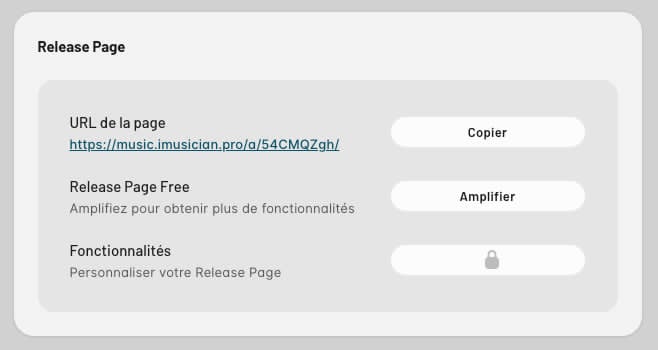
with the Rockstar plan, we are supposed to have access to all Release Page Pro features, however these features are currently locked and marked with a padlock (see screenshot).

The release was approved by iMusician on January 20th (7 days ago), so this doesn’t seem to be an activation delay issue.

Could you please help me clarify this?

Many thanks for your time!

Sans titre

Hey @Fab_TTT, I’ve nudged our team so they can take a closer look. We’ll get back to you asap regarding this :slight_smile:

2 Likes

Thank you Carlos :slight_smile:

Hello @Carlos,

Did you have any news regarding my last question?

Thank you!

No update yet I’m afraid. I’ll let you know as soon as I have news to share :slight_smile:

1 Like

Update: It should be fixed now!

It is!

Thank you & your team for your support!

All the best,

Fab’.

1 Like

Cool! All the best to you as well :sunflower:

1 Like